CPS 353: Internet Programming
Databases, SQL, and MySQL
Simon Miner
Gordon College
Last Modified: 09/25/2013
Selected content adapted from material by Marty Stepp, Jessica Miller, and Victoria Kirst © 2012. Used by permission.
Agenda
- Scripture (Ephesians 5) and Prayer
- Check-in
- Web Servers and HTTP
- Web Server Topic Reports
- Databases and SQLL
- Database Design
- Milestone 4
Check-in
- Syllabus update
- Material to read from Agile Web Development with Rails 4 book next week
- Install Ruby and Rails on your local sysstem
- Work through example Depot application
- Milestone 3
- Homework 3 Update
- Please email me the URLs to your work
Web Server Basics
Web server is the program on the remote computer generating and serving up content
- takes a request
- returns a response
- both of these have headers -- i.e. content (MIME) type, user agent, cookies, etc.
- server settings reside in a configuration file
- for instance, Apache configuration values live in the
httpd.conf file
Common Server Configuration Values
- Document Root -- server-side directory that serves as the root for URLs to the server
- static content (i.e. HTML files) typically must reside beneath the document root
- Server Name
-- domain name for which the server answers requests
- Used in conjunction with DNS to route requests to the server
- Location -- path configured to execute special application code (i.e. PHP programs)
- does not need to correspond to a real directory within the document root
Class Research Mini-topics on Web Servers
- HTTP Methods
- User agents
- Server logs
- Custom error pages
- Web server parent and child processes
The $_SERVER superglobal array
| index |
description |
example |
$_SERVER["SERVER_NAME"] |
name of this web server |
"math-cs.gordon.edu" |
$_SERVER["SERVER_ADDR"] |
IP address of web server |
"128.208.179.154" |
$_SERVER["REMOTE_HOST"] |
user's domain name |
"hsd1.wa.comcast.net" |
$_SERVER["REMOTE_ADDR"] |
user's IP address |
"57.170.55.93" |
$_SERVER["HTTP_USER_AGENT"] |
user's web browser |
"Mozilla/5.0 (Windows; ..." |
$_SERVER["HTTP_REFERER"] |
where user was before this page |
"http://www.google.com/" |
$_SERVER["REQUEST_METHOD"] |
HTTP method used to contact server |
"GET" or "POST" |
What is a web service?
web service: software functionality that can be invoked through the internet using common protocols
- like a remote function you can call by contacting a program on a web server
- many web services accept parameters and produce results
- can be written in PHP (or another language) and contacted by the browser in XHTML and/or Ajax code
- service's output is often not HTML but rather text, JSON, XML, or other content types
Content ("MIME") types
| MIME type |
related file extension |
| text/plain | .txt |
| text/html | .html, .htm, ... |
| text/css | .css |
| text/javascript | .js |
| text/xml | .xml |
| image/gif | .gif |
| image/jpeg | .jpg, .jpeg |
| video/quicktime | .mov |
| application/octet-stream | .exe |
Setting content type with header
header("Content-type: type/subtype");
header("Content-type: text/plain");
print("This output will appear as plain text now!\n");
- by default, a PHP script's output is assumed to be HTML
- use the
header function to specify non-HTML output
- must appear before any other output generated by the script
Example: Exponent web service
-
Write a web service that accepts a
base and exponent and outputs base raised to the exponent power. For example, the following query should output 81 :
http://example.com/exponent.php?base=3&exponent=4
-
solution:
header("Content-type: text/plain");
$base = $_GET["base"];
$exp = $_GET["exponent"];
$result = pow($base, $exp);
print $result;
Emitting partial-page HTML data
<?php if ($_GET["type"] == "html") { ?>
<ul>
<?php foreach ($students as $kid) { ?>
<li> <?= $kid ?> </li>
<?php } ?>
</ul>
<?php } ?>
-
some web services do output HTML, but not a complete page
-
the partial-page HTML is meant to be fetched by Ajax and injected into an existing page
Emitting XML data
...
header("Content-type: text/xml");
print("<?xml version=\"1.0\" encoding=\"UTF-8\"?>\n");
?><books>
<?php foreach ($books as $title) { ?>
	<book title="<?= $title ?>" />
<?php } ?>
</books>
-
specify a content type of
text/xml or application/xml
-
print an XML prologue (the
<?xml line) first
-
important: no whitespace output can precede the prologue; must be
printed
-
then print each line of XML data/tags as output
-
some PHP libraries automatically generate XML for you from other data (e.g. databases)
Reporting errors
-
how does a web service indicate an error to the client?
-
error messages (
print) are not ideal, because they could be confused for normal output
- web service should return an HTTP "error code" to the browser, possibly followed by output
-
these are the codes you see in Firebug's console and in your Ajax request's
.status property
| HTTP code | Meaning |
| 200 |
OK |
| 301-303 |
page has moved (permanently or temporarily) |
| 400 |
illegal request |
| 403 |
you are forbidden to access this page |
| 404 |
page not found |
| 500 |
internal server error |
| complete list |
Using headers for HTTP error codes
header("HTTP/1.1 code description");
if ($_POST["foo"] != "bar") {
header("HTTP/1.1 400 Invalid Request");
die("An HTTP error 400 (invalid request) occurred.");
}
if (!file_exists($input_file_path)) {
	header("HTTP/1.1 404 File Not Found");
	die("HTTP error 404 occurred: File not found ($input_file_path)");
}
-
header can also be used to send back HTTP error codes
header("HTTP/1.1 403 Forbidden");header("HTTP/1.1 404 File Not Found");header("HTTP/1.1 500 Server Error");
Checking for mandatory query parameters
function require_params($params) {
$params = func_get_args();
foreach ($params as $param) {
if (!isset($_POST[$param])) {
header("HTTP/1.1 400 Invalid Request");
die("HTTP/1.1 400 Invalid Request: missing required parameter $param");
}
}
}
-
func_get_args function allows a function to accept a varying # of params
13.1: Database Basics
-
13.1: Database Basics
-
13.2: SQL
-
13.3: Multi-table Queries
Relational databases
- relational database: A method of structuring data as tables associated to each other by shared attributes.
- a table row corresponds to a unit of data called a record; a column corresponds to an attribute of that record
- relational databases typically use Structured Query Language (SQL) to define, manage, and search data
Why use a database?
- powerful: can search it, filter data, combine data from multiple sources
- fast: can search/filter a database very quickly compared to a file
- big: scale well up to very large data sizes
- safe: built-in mechanisms for security and failure recovery (e.g. transactions)
- multi-user: concurrency features let many users view/edit data at same time
- abstract: provides layer of abstraction between stored data and app(s)
- many database programs understand the same SQL commands
Database software
- Oracle
- Microsoft SQL Server (powerful) and Microsoft Access (simple)
- PostgreSQL (powerful/complex free open-source database system)
- SQLite (transportable, lightweight free open-source database system)
 MySQL (powerful free (?) open-source database system)
- many servers run "LAMP" (Linux, Apache, MySQL, and PHP/Perl/Python)
- Wikipedia is run on PHP and MySQL
- we will use MySQL in this course
Example simpsons database
students
| id | name | email |
|---|
| 123 | Bart | bart@fox.com |
| 456 | Milhouse | milhouse@fox.com |
| 888 | Lisa | lisa@fox.com |
| 404 | Ralph | ralph@fox.com |
|
teachers
| id | name |
|---|
| 1234 | Krabappel |
| 5678 | Hoover |
| 9012 | Miner |
|
courses
| id | name | teacher_id |
|---|
| 10001 | Computer Science 142 | 1234 |
| 10002 | Computer Science 143 | 5678 |
| 10003 | Computer Science 190M | 9012 |
| 10004 | Informatics 100 | 1234 |
|
grades
| student_id | course_id | grade |
|---|
| 123 | 10001 | B- |
| 123 | 10002 | C |
| 456 | 10001 | B+ |
| 888 | 10002 | A+ |
| 888 | 10003 | A+ |
| 404 | 10004 | D+ |
|
- to test queries on this database, log into MySQL on ips.cs.gordon.edu with your username and type "use simpsons;"
Example world database
countries
Other columns:
region,
surface_area,
life_expectancy,
gnp_old,
local_name,
government_form,
capital,
code2
| code |
name |
continent |
independence_year |
population |
gnp |
head_of_state |
... |
| AFG |
Afghanistan |
Asia |
1919 |
22720000 |
5976.0 |
Mohammad Omar |
... |
| NLD |
Netherlands |
Europe |
1581 |
15864000 |
371362.0 |
Beatrix |
... |
| ... | ... | ... | ... | ... | ... | ... | ... |
|
cities
| id |
name |
country_code |
district |
population |
| 3793 | New York | USA | New York | 8008278 |
| 1 | Los Angeles | USA | California | 3694820 |
| ... | ... | ... | ... | ... |
|
languages
| country_code | language | official | percentage |
|---|
| AFG | Pashto | T | 52.4 |
NLD | Dutch | T | 95.6 |
| ... | ... | ... | ... |
|
- to test queries on this database, log into MySQL on ips.cs.gordon.edu with your username and type "use world;"
Example imdb database
actors
| id | first_name | last_name | gender |
|---|
| 433259 | William | Shatner | M |
| 797926 | Britney | Spears | F |
| 831289 | Sigourney | Weaver | F |
| ... |
movies
| id | name | year | rank |
|---|
| 112290 | Fight Club | 1999 | 8.5 |
| 209658 | Meet the Parents | 2000 | 7 |
| 210511 | Memento | 2000 | 8.7 |
| ... |
roles
| actor_id | movie_id | role |
|---|
| 433259 | 313398 | Capt. James T. Kirk |
| 433259 | 407323 | Sgt. T.J. Hooker |
| 797926 | 342189 | Herself |
| ... |
movies_genres
| movie_id | genre |
|---|
| 209658 | Comedy |
| 313398 | Action |
| 313398 | Sci-Fi |
| ... |
directors
| id | first_name | last_name |
|---|
| 24758 | David | Fincher |
| 66965 | Jay | Roach |
| 72723 | William | Shatner |
| ... |
movies_directors
| director_id | movie_id |
|---|
| 24758 | 112290 |
| 66965 | 209658 |
| 72723 | 313398 |
| ... |
- to test queries on this database, log into MySQL on ips.cs.gordon.edu with your username and type "use imdb;"
13.2: SQL
-
13.1: Database Basics
-
13.2: SQL
-
13.3: Multi-table Queries
SQL basics
SELECT name FROM cities WHERE id = 17;
INSERT INTO countries VALUES ('SLD', 'ENG', 'T', 100.0);
- Structured Query Language (SQL): a language for searching and updating a database
- a standard syntax that is used by all database software (with minor incompatiblities)
-
generally case-insensitive
- a declarative language: describes what data you are seeking, not exactly how to find it
Issuing SQL commands directly in MySQL
SHOW DATABASES;
USE database;
SHOW TABLES;
- SSH to ips.cs.gordon.edu, then type:
$ mysql -u username -p
Password:
Welcome to the MySQL monitor.  Commands end with ; or \g.

mysql> use project_username;
Database changed

mysql> Sshow tables;
+-----------+
| orders    |
| peers     |
| users     |
| ...       |
+-----------+
The SQL SELECT statement
SELECT column(s) FROM table;
SELECT name, code FROM countries;
| name | code |
|---|
| China | CHN |
| United States | IND |
| Indonesia | USA |
| Brazil | BRA |
| Pakistan | PAK |
| ... | ... |
- the
SELECT statement searches a database and returns a set of results
- the column name(s) written after
SELECT filter which parts of the rows are returned
- table and column names are case-sensitive (at least in MySQL)
SELECT * FROM table; keeps all columns
The DISTINCT modifier
SELECT DISTINCT column(s) FROM table;
SELECT language
FROM languages;
| language |
|---|
| Dutch |
| English |
| English |
| Papiamento |
| Spanish |
| Spanish |
| Spanish |
| ... |
|
SELECT DISTINCT language
FROM languages;
| language |
|---|
| Dutch |
| English |
| Papiamento |
| Spanish |
| ... |
|
- eliminates duplicates from the result set
The WHERE clause
SELECT column(s) FROM table WHERE condition(s);
SELECT name, population FROM cities WHERE country_code = "FSM";
| name | population |
|---|
| Weno | 22000 |
| Palikir | 8600 |
WHERE clause filters out rows based on their columns' data values- in large databases, it's critical to use a
WHERE clause to reduce the result set size
- suggestion: when trying to write a query, think of the
FROM part first, then the WHERE part, and lastly the SELECT part
More about the WHERE clause
WHERE column operator value(s)
SELECT name, gnp FROM countries WHERE gnp > 2000000;
| code | name | gnp |
|---|
| JPN | Japan | 3787042.00 |
| DEU | Germany | 2133367.00 |
| USA | United States | 8510700.00 |
| ... | ... | ... |
- the
WHERE portion of a SELECT statement can use the following operators:
=, >, >=, <, <=<> : not equalBETWEEN min AND maxLIKE patternIN (value, value, ..., value)
Multiple WHERE clauses: AND, OR
SELECT * FROM cities WHERE code = 'USA' AND population >= 2000000;
| id | name | country_code | district | population |
|---|
| 3793 | New York | USA | New York | 8008278 |
| 3794 | Los Angeles | USA | California | 3694820 |
| 3795 | Chicago | USA | Illinois | 2896016 |
| ... | ... | ... | ... | ... |
- multiple
WHERE conditions can be combined using AND and OR
Approximate matches: LIKE
WHERE column LIKE pattern
SELECT code, name, population FROM countries WHERE name LIKE 'United%';
| code | name | population |
|---|
| ARE | United Arab Emirates | 2441000 |
| GBR | United Kingdom | 59623400 |
| USA | United States | 278357000 |
| UMI | United States Minor Outlying Islands | 0 |
LIKE 'text%' searches for text that starts with a given prefixLIKE '%text' searches for text that ends with a given suffixLIKE '%text%' searches for text that contains a given substring
Sorting by a column: ORDER BY
ORDER BY column(s)
SELECT code, name, population FROM countries
WHERE name LIKE 'United%' ORDER BY population;
| code | name | population |
|---|
| UMI | United States Minor Outlying Islands | 0 |
| ARE | United Arab Emirates | 2441000 |
| GBR | United Kingdom | 59623400 |
| USA | United States | 278357000 |
- can write
ASC or DESC to sort in ascending (default) or descending order:
SELECT * FROM countries ORDER BY population DESC;
- can specify multiple orderings in decreasing order of significance:
SELECT * FROM countries ORDER BY population DESC, gnp;
-
see also:
GROUP BY
Limiting rows: LIMIT
LIMIT number
SELECT name FROM cities WHERE name LIKE 'K%' LIMIT 5;
| name |
|---|
| Kabul |
| Khulna |
| Kingston upon Hull |
| Koudougou |
| Kafr al-Dawwar |
-
can be used to get the top-N of a given category (
ORDER BY and LIMIT)
-
also useful as a sanity check to make sure your query doesn't return 107 rows
Learning about databases and tables
SHOW DATABASES;
SHOW TABLES;
DESCRIBE table;
SHOW TABLES;
+-----------+
| students  |
| courses   |
| grades    |
| teachers  |
+-----------+    4 rows in set
The SQL statement
INSERT INTO table
VALUES (value, value, ..., value);
INSERT INTO students
VALUES (789, "Nelson", "muntz@fox.com", "haha!");
- adds a new row to the given table
- columns' values should be listed in the same order as in the table
- How would we record that Nelson took CSE 190M and got a D+ in it?
More about INSERT
INSERT INTO table (columnName, columnName, ..., columnName)
VALUES (value, value, ..., value);
INSERT INTO students (name, email)
VALUES ("Lewis", "lewis@fox.com");
- some columns have default or auto-assigned values (such as IDs)
- omitting them from the INSERT statement uses the defaults
The SQL statement
REPLACE INTO table (columnName, columnName, ..., columnName)
VALUES (value, value, ..., value);
REPLACE INTO students
VALUES (789, "Martin", "prince@fox.com");
- just like INSERT, but if an existing row exists for that key (ID), it will be replaced
- can pass optional list of column names, like with INSERT
The SQL statement
UPDATE table
SET column = value,
    ...,
    column = value
WHERE column = value;
UPDATE students
SET email = "lisasimpson@gmail.com"
WHERE id = 888;
- modifies an existing row(s) in a table
- BE CAREFUL! If you omit the WHERE, it modifies ALL rows
The SQL statement
DELETE FROM table
WHERE condition;
DELETE FROM students
WHERE id = 888;
- removes existing row(s) in a table
- can be used with other syntax like LIMIT, LIKE, ORDER BY, etc.
- BE CAREFUL! If you omit the WHERE, it deletes ALL rows
and
an entire database
CREATE DATABASE name;
DROP DATABASE name;
CREATE DATABASE warcraft;
- adds/deletes an entire database from the server
Creating and deleting a table
CREATE TABLE name (
	columnName type constraints,
	...
	columnName type constraints
);
DROP TABLE name;
CREATE TABLE students (
	id INTEGER,
	name VARCHAR(20),
	email VARCHAR(32),
	password VARCHAR(16)
);
- adds/deletes a table from this database
- all columns' names and types must be listed (see next slide)
SQL
BOOLEAN: either TRUE or FALSEINTEGERDOUBLEVARCHAR(length) : a stringENUM(value, ..., value): a fixed set of valuesDATE, TIME, DATETIMETEXT, LONGTEXT : longer text dataBLOB : binary data
Column constraints
CREATE TABLE students (
	id INTEGER UNSIGNED NOT NULL AUTO_INCREMENT PRIMARY KEY,
	name VARCHAR(20) NOT NULL,
	email VARCHAR(32),
	password VARCHAR(16) NOT NULL DEFAULT "12345"
);
NOT NULL: not allowed to insert a null/empty value in any row for that columnPRIMARY KEY / UNIQUE: no two rows can have the same valueDEFAULT value: if no value is provided, use the given defaultAUTO_INCREMENT: default value is the last row's value plus 1 (useful for IDs)UNSIGNED: don't allow negative numbers (INTEGER only)
Rename a table
ALTER TABLE name RENAME TO newName;
ALTER TABLE students RENAME TO children;
- changes the name of an existing table
Add/remove/modify a column in a table
ALTER TABLE name
	ADD COLUMN columnName type constraints;

ALTER TABLE name DROP COLUMN columnName;

ALTER TABLE name
	CHANGE COLUMN oldColumnName newColumnName type constraints;
- adds/deletes/respecifies a column in an existing table
- if a column is added, all existing rows are given a default value for that column
13.3: Multi-table Queries
-
13.1: Database Basics
-
13.2: SQL
-
13.3: Multi-table Queries
Example simpsons database
students
| id | name | email |
|---|
| 123 | Bart | bart@fox.com |
| 456 | Milhouse | milhouse@fox.com |
| 888 | Lisa | lisa@fox.com |
| 404 | Ralph | ralph@fox.com |
|
teachers
| id | name |
|---|
| 1234 | Krabappel |
| 5678 | Hoover |
| 9012 | Miner |
|
courses
| id | name | teacher_id |
|---|
| 10001 | Computer Science 142 | 1234 |
| 10002 | Computer Science 143 | 5678 |
| 10003 | Computer Science 190M | 9012 |
| 10004 | Informatics 100 | 1234 |
|
grades
| student_id | course_id | grade |
|---|
| 123 | 10001 | B- |
| 123 | 10002 | C |
| 456 | 10001 | B+ |
| 888 | 10002 | A+ |
| 888 | 10003 | A+ |
| 404 | 10004 | D+ |
|
Querying multi-table databases
When we have larger datasets spread across multiple tables, we need queries that can answer high-level questions such as:
- What courses has Bart taken and gotten a B- or better?
- What courses have been taken by both Bart and Lisa?
- Who are all the teachers Bart has had?
- How many total students has Ms. Krabappel taught, and what are their names?
To do this, we'll have to join data from several tables in our SQL queries.
Cross product with JOIN
SELECT column(s) FROM table1 JOIN table2;
SELECT * FROM students JOIN grades;
| id | name | email | student_id | course_id | grade |
|---|
| 123 | Bart | bart@fox.com | 123 | 10001 | B- |
| 404 | Ralph | ralph@fox.com | 123 | 10001 | B- |
| 456 | Milhouse | milhouse@fox.com | 123 | 10001 | B- |
| 888 | Lisa | lisa@fox.com | 123 | 10001 | B- |
| 123 | Bart | bart@fox.com | 123 | 10002 | C |
| 404 | Ralph | ralph@fox.com | 123 | 10002 | C |
| ... (24 rows returned) |
- cross product or Cartesian product: combines each row of first table with each row of second
- produces M * N rows, where table 1 has M rows and table 2 has N
- problem: produces too much irrelevant/meaningless data
Joining with ON clauses
SELECT column(s)
FROM table1
JOIN table2 ON condition(s)
...
JOIN tableN ON condition(s);
SELECT *
FROM students
JOIN grades ON id = student_id;
- join: combines records from two or more tables if they satisfy certain conditions
- the
ON clause specifies which records from each table are matched
- the rows are often linked by their key columns (id)
Join example
SELECT *
FROM students
JOIN grades ON id = student_id;
| id | name | email | student_id | course_id | grade |
|---|
| 123 | Bart | bart@fox.com | 123 | 10001 | B- |
| 123 | Bart | bart@fox.com | 123 | 10002 | C |
| 404 | Ralph | ralph@fox.com | 404 | 10004 | D+ |
| 456 | Milhouse | milhouse@fox.com | 456 | 10001 | B+ |
| 888 | Lisa | lisa@fox.com | 888 | 10002 | A+ |
| 888 | Lisa | lisa@fox.com | 888 | 10003 | A+ |
Filtering columns in a join
SELECT name, course_id, grade
FROM students
JOIN grades ON id = student_id;
| name | course_id | grade |
|---|
| Bart | 10001 | B- |
| Bart | 10002 | C |
| Ralph | 10004 | D+ |
| Milhouse | 10001 | B+ |
| Lisa | 10002 | A+ |
| Lisa | 10003 | A+ |
Filtered join (JOIN with WHERE)
SELECT name, course_id, grade
FROM students
JOIN grades ON id = student_id
WHERE name = 'Bart';
| name | course_id | grade |
|---|
| Bart | 10001 | B- |
| Bart | 10002 | C |
FROM / JOIN glue the proper tables together, and WHERE filters the results- what goes in the
ON clause, and what goes in WHERE?
ON directly links columns of the joined tablesWHERE sets additional constraints such as particular values (123, 'Bart')
What's wrong with this?
SELECT name, id, course_id, grade
FROM students
JOIN grades ON id = 123
WHERE id = student_id;
| name | id | course_id | grade |
|---|
| Bart | 123 | 10001 | B- |
| Bart | 123 | 10002 | C |
- The above query produces the same rows as the previous one, but it is poor style. Why?
-
The
JOIN ON clause is poorly chosen. It doesn't really say what connects a grades record to a students record.
- They are related when they are for a student with the same
id.
- Filtering out by a specific ID or name should be done in the
WHERE clause, not JOIN ON.
Giving aliaes to tables
SELECT s.name, g.*
FROM students s
JOIN grades g ON s.id = g.student_id
WHERE g.grade <= 'C';
| name | student_id | course_id | grade |
|---|
| Bart | 123 | 10001 | B- |
| Bart | 123 | 10002 | C |
| Milhouse | 456 | 10001 | B+ |
| Lisa | 888 | 10002 | A+ |
| Lisa | 888 | 10003 | A+ |
- can give aliaes to tables, like a variable name in Java
- to specify all columns from a table, write
table.*
- (
grade column sorts alphabetically, so grades C or better are ones <= it)
Multi-way join
SELECT c.name
FROM courses c
JOIN grades g ON g.course_id = c.id
JOIN students bart ON g.student_id = bart.id
WHERE bart.name = 'Bart' AND g.grade <= 'B-';
| name |
|---|
| Computer Science 142 |
- More than 2 tables can be joined, as shown above
- What does the above query represent?
- The names of all courses in which Bart has gotten a B- or better.
Practice queries
- What are the names of all teachers Bart has had?
SELECT DISTINCT t.name
FROM teachers t
JOIN courses c ON c.teacher_id = t.id
JOIN grades g ON g.course_id = c.id
JOIN students s ON s.id = g.student_id
WHERE s.name = 'Bart';
- What are the names of all students that Ms. Krabappel has taught?
SELECT DISTINCT s.name
FROM students s
JOIN grades g ON s.id = g.student_id
JOIN courses c ON g.course_id = c.id
JOIN teachers t ON t.id = c.teacher_id
WHERE t.name = 'Krabappel';
Designing a query
- Figure out the proper SQL queries in the following way:
- Which table(s) contain the critical data? (
FROM)
- Which columns do I need in the result set? (
SELECT)
- How are tables connected (
JOIN) and values filtered (WHERE)?
- Test on a small data set (when available)
- Confirm on the real data set
- Try out the queries first in the MySQL console.
- Write the PHP/Ruby code to run those same queries.
- Make sure to check for SQL errors at every step!!
Example imdb database
actors
| id | first_name | last_name | gender |
|---|
| 433259 | William | Shatner | M |
| 797926 | Britney | Spears | F |
| 831289 | Sigourney | Weaver | F |
| ... |
movies
| id | name | year | rank |
|---|
| 112290 | Fight Club | 1999 | 8.5 |
| 209658 | Meet the Parents | 2000 | 7 |
| 210511 | Memento | 2000 | 8.7 |
| ... |
roles
| actor_id | movie_id | role |
|---|
| 433259 | 313398 | Capt. James T. Kirk |
| 433259 | 407323 | Sgt. T.J. Hooker |
| 797926 | 342189 | Herself |
| ... |
movies_genres
| movie_id | genre |
|---|
| 209658 | Comedy |
| 313398 | Action |
| 313398 | Sci-Fi |
| ... |
directors
| id | first_name | last_name |
|---|
| 24758 | David | Fincher |
| 66965 | Jay | Roach |
| 72723 | William | Shatner |
| ... |
movies_directors
| director_id | movie_id |
|---|
| 24758 | 112290 |
| 66965 | 209658 |
| 72723 | 313398 |
| ... |
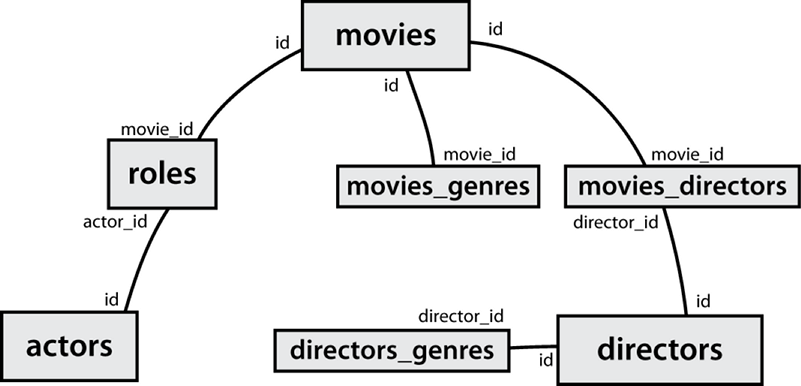
IMDb table relationships / ids
IMDb query example
[stepp@webster ~]$ mysql -u myusername -p
Enter password:
Welcome to the MySQL monitor.  Commands end with ; or \g.

mysql> use imdb;
Database changed

mysql> select * from actors where first_name like '%mick%';
+--------+------------+-----------+--------+
| id     | first_name | last_name | gender |
+--------+------------+-----------+--------+
|  71699 | Mickey     | Cantwell  | M      |
| 115652 | Mickey     | Dee       | M      |
| 470693 | Mick       | Theo      | M      |
| 716748 | Mickie     | McGowan   | F      |
+--------+------------+-----------+--------+
4 rows in set (0.01 sec)
IMDb practice queries
- What are the names of all movies released in 1995?
- How many people played a part in the movie "Lost in Translation"?
- What are the names of all the people who played a part in the movie "Lost in Translation"?
- Who directed the movie "Fight Club"?
- How many movies has Clint Eastwood directed?
- What are the names of all movies Clint Eastwood has directed?
- What are the names of all directors who have directed at least one horror film?
- What are the names of every actor who has appeared in a movie directed by Christopher Nolan?
Database Design
-
13.1: Database Basics
-
13.2: SQL
-
13.3: Multi-table Queries
Database design principles
- database design : the act of deciding the schema for a database
- database schema: a description of what tables a database should have, what columns each table should contain, which columns' values must be unique, etc.
- some database design principles:
- keep it simple, stupid (KISS)
- provide an identifier by which any row can be uniquely fetched
- eliminate redundancy, especially of lengthy data (strings)
- integers are smaller than strings and better to repeat
- favor integer data for comparisons and repeated values
- integers are smaller than strings and better to repeat
- integers can be compared/searched more quickly than strings, real numbers
First database design
student_grades
| name | email | course | teacher | grade |
|---|
| Bart | bart@fox.com | Computer Science 142 | Krabappel | B- |
| Bart | bart@fox.com | Computer Science 143 | Hoover | C |
| Milhouse | milhouse@fox.com | Computer Science 142 | Krabappel | B+ |
| Lisa | lisa@fox.com | Computer Science 143 | Hoover | A+ |
| Lisa | lisa@fox.com | Computer Science 190M | Miner | A+ |
| Ralph | ralph@fox.com | Informatics 100 | Krabappel | D+ |
- what's good and bad about this design?
- good: simple (one table), can see all data in one place
- bad: redundancy (name, email, course repeated frequently)
- bad: most searches (e.g. find a student's courses) will have to rely on string comparisons
- bad: there is no single column whose value will be unique in each row
Improved database design
students
| id | name | email |
|---|
| 123 | Bart | bart@fox.com |
| 456 | Milhouse | milhouse@fox.com |
| 888 | Lisa | lisa@fox.com |
| 404 | Ralph | ralph@fox.com |
|
courses
| id | name | teacher_id |
|---|
| 10001 | Computer Science 142 | 1234 |
| 10002 | Computer Science 143 | 5678 |
| 10003 | Computer Science 190M | 9012 |
| 10004 | Informatics 100 | 1234 |
|
grades
| student_id | course_id | grade |
|---|
| 123 | 10001 | B- |
| 123 | 10002 | C |
| 456 | 10001 | B+ |
| 888 | 10002 | A+ |
| 888 | 10003 | A+ |
| 404 | 10004 | D+ |
|
teachers
| id | name |
|---|
| 1234 | Krabappel |
| 5678 | Hoover |
| 9012 | Miner |
|
- normalizing: splitting tables to improve structure / redundancy (linked by unique IDs)
- primary key: a column guaranteed to be unique for each record (e.g. Lisa Simpson's ID 888)
- foreign key: a column in table A storing a primary key value from table B
- (e.g. records in
grades with student_id of 888 are Lisa's grades)
Design question
students
| id | name | email |
|---|
| 123 | Bart | bart@fox.com |
| 456 | Milhouse | milhouse@fox.com |
| 888 | Lisa | lisa@fox.com |
| 404 | Ralph | ralph@fox.com |
|
courses
| id | name |
|---|
| 10001 | Computer Science 142 |
| 10002 | Computer Science 143 |
| 10003 | Computer Science 190M |
| 10004 | Informatics 100 |
|
grades
| student_id | course_id | grade |
|---|
| 123 | 10001 | B- |
| 123 | 10002 | C |
| 456 | 10001 | B+ |
| 888 | 10002 | A+ |
| 888 | 10003 | A+ |
| 404 | 10004 | D+ |
|
- suppose we want to keep track of the teachers who teach each course
- e.g. Ms. Krabappel always teaches CSE 142 and INFO 100
- e.g. Ms. Hoover always teaches CSE 143
- e.g. Mr. Miner always teaches CSE 190M
- what tables and/or columns should we add to the database?
Design answer
teachers
| id | name |
|---|
| 1234 | Krabappel |
| 5678 | Hoover |
| 9012 | Miner |
|
courses
| id | name | teacher_id |
|---|
| 10001 | Computer Science 142 | 1234 |
| 10002 | Computer Science 143 | 5678 |
| 10003 | Computer Science 190M | 9012 |
| 10004 | Informatics 100 | 1234 |
|
- add a
teachers table containing information about instructors
- link this to courses by teacher IDs
- why not just skip the
teachers table and put the teacher's name as a column in courses?
- repeated teacher names are redundant and large in size
Relationships between rows (entities)
- The connection between rows (or entities) in one table to those in another table is called a relationship
- Foreign keys model relationships, which can involve different numbers of rows in each table.
- one-to-one relationship: a single row in one table connects to a single row in another (example: if each course uses a single textbook, there could be a one-to-one relationship between the course and textbook tables)
- one-to-many/many-to-one relationship: a single row in one table connects to multiple rows in another table (i.e. there is a one-to-many relationship between students and courses, and a separate many-to-one relationship between courses and students)
- many-to-many relationship: multiple rows in one table connect to multiple rows in another table - this often happens through a third table that models these connections (i.e. grades provides a many-to-many relationship between students and courses)
Foreign key relationships
CREATE TABLE GRADES
...
    FOREIGN KEY (STUDENT_ID) REFERENCES STUDENT (ID)
);
- sometimes a row in one table doesn't make sense without a corresponding row in another table (i.e. a grade needs a student and a course to exist)
- foreign key definitions can automatically "clean up" these "weak" rows when a "strong" one is deleted
CREATE TABLE GRADES
...
    FOREIGN KEY (STUDENT_ID) REFERENCES STUDENT (ID) DELETE CASCADE
);
Schema diagrams
- Visual representation of tables and the relationships between them
- Tables are represented by a box
- Table name at top-center of box followed by a horizontal line
- Columns listed vertically
- Primary key column(s) are underlined
- Relationships represented by lines between tables
- Arrowhead at the end pointing to the "one" table in the relationship
- One-to-one relationship lines have two arrowheads
- One-to-many/many-to-one relationship lines have one arrowhead
- Many-to-many relationship lines have no arrowheads
Milestone 4