CPS 353: Internet Programming
Sessions and Security
Simon Miner
Gordon College
Last Modified: 11/13/2013
Selected content adapted from material by Marty Stepp, Jessica Miller, and Victoria Kirst © 2012. Used by permission.
Agenda
- Scripture (Colossians 2) and Prayer
- Check-in
- Sessions
- Web Security
- Homework 7
Check-in
- Syllabus Updates
- Homework 6
- Milestone 6
- Nested routes -- Kenneth Burgess and Peter Story (?)
- Updating price totals
14.1: Cookie Basics
-
14.1: Cookie Basics
-
14.2: Programming with Cookies
-
14.3: Sessions
Stateful client/server interaction
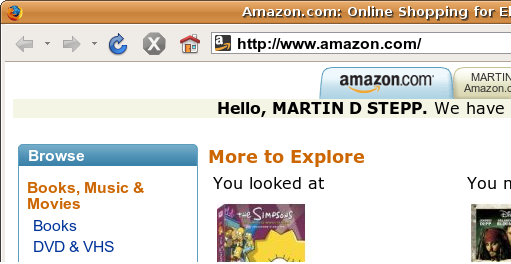
Sites like amazon.com seem to "know who I am." How do they do this? How does a client uniquely identify itself to a server, and how does the server provide specific content to each client?
- HTTP is a stateless protocol; it simply allows a browser to request a single document from a web server
- today we'll learn about pieces of data called cookies used to work around this problem, which are used as the basis of higher-level sessions between clients and servers
What is a cookie?
- cookie: a small amount of information sent by a server to a browser, and then sent back by the browser on future page requests
- cookies have many uses:
- authentication
- user tracking
- maintaining user preferences, shopping carts, etc.
- a cookie's data consists of a single name/value pair, sent in the header of the client's HTTP GET or POST request
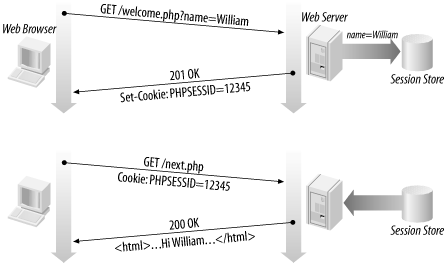
How cookies are sent
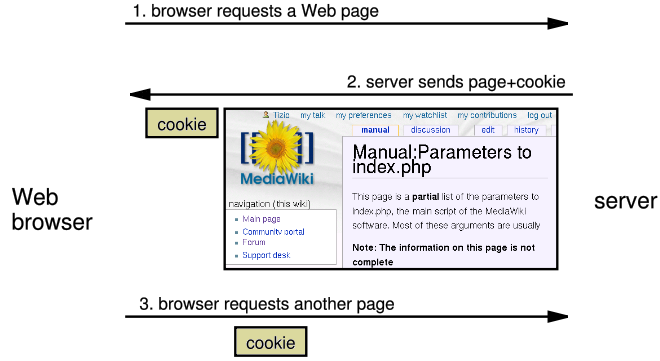
- when the browser requests a page, the server may send back a cookie(s) with it
- if your server has previously sent any cookies to the browser, the browser will send them back on subsequent requests
-
alternate model: client-side JavaScript code can set/get cookies
Myths about cookies
- Myths:
- Cookies are like worms/viruses and can erase data from the user's hard disk.
- Cookies are a form of spyware and can steal your personal information.
- Cookies generate popups and spam.
- Cookies are only used for advertising.
- Facts:
- Cookies are only data, not program code.
- Cookies cannot erase or read information from the user's computer.
- Cookies are usually anonymous (do not contain personal information).
- Cookies CAN be used to track your viewing habits on a particular site.
A "tracking cookie"
-
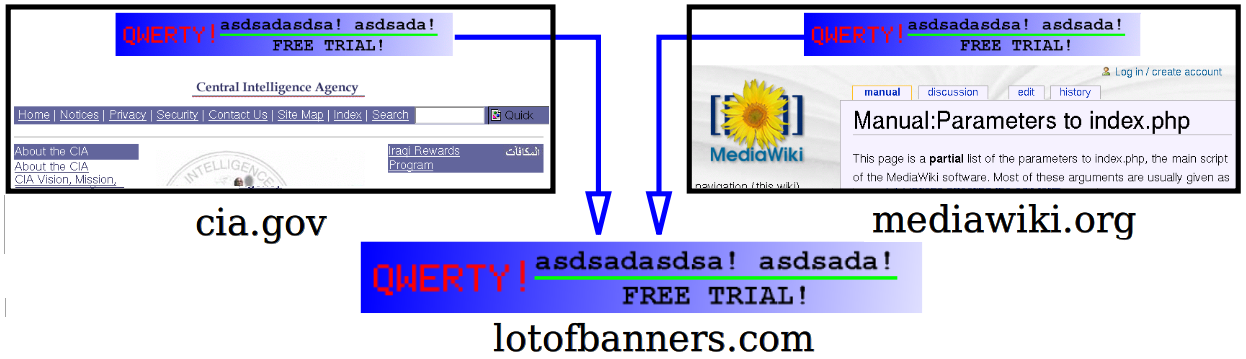
an advertising company can put a cookie on your machine when you visit one site, and see it when you visit another site that also uses that advertising company
-
therefore they can tell that the same person (you) visited both sites
-
can be thwarted by telling your browser not to accept "third-party cookies"
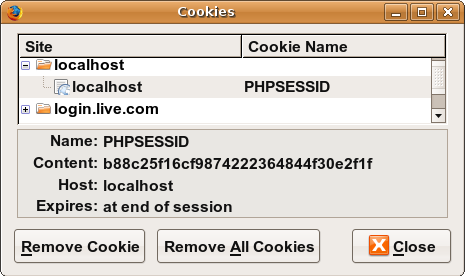
Where are the cookies on my computer?
- IE: HomeDirectory\Cookies
- e.g. C:\Documents and Settings\jsmith\Cookies
- each is stored as a
.txt file similar to the site's domain name
- Chrome: C:\Users\username\AppData\Local\Google\Chrome\User Data\Default
- Firefox: HomeDirectory\.mozilla\firefox\???.default\cookies.txt
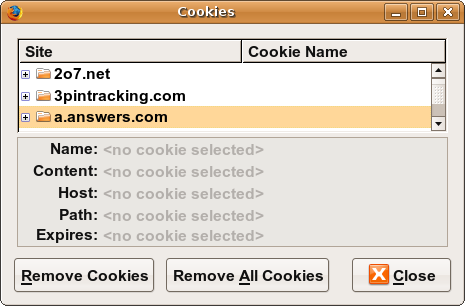
- view cookies in Firefox preferences: Privacy, Remove Individual Cookies...
How long does a cookie exist?
- session cookie : the default type; a temporary cookie that is stored only in the browser's memory
- when the browser is closed, temporary cookies will be erased
- can not be used for tracking long-term information
- safer, because no programs other than the browser can access them
- persistent cookie : one that is stored in a file on the browser's computer
- can track long-term information
- potentially less secure, because users (or programs they run) can open cookie files, see/change the cookie values, etc.
14.2: Programming with Cookies
-
14.1: Cookie Basics
-
14.2: Programming with Cookies
-
14.3: Sessions
Cookies in JavaScript
document.cookie = "username=smith";
document.cookie = "password=12345";
document.cookie = "age=29; expires=Thu, 01-Jan-1970 00:00:01 GMT";
...
var allCookies = document.cookie.split(";");
for (var i = 0; i < allCookies.length; i++) {
var eachCookie = allCookies[i].split("=");
var cookieName = eachCookie[0];
var cookieValue = eachCookie[1];
...
}
- JS has a global
document.cookie field (a string)
-
you can manually set/get cookie data from this field (sep. by
;), and it will be saved in the browser
-
to delete a cookie, set it to 'expire' in the past
Setting a cookie in PHP
setcookie("name", "value");
setcookie("username", "martay");
setcookie("favoritecolor", "blue");
setcookie causes your script to send a cookie to the user's browsersetcookie must be called before any output statements (HTML blocks, print, or echo)- you can set multiple cookies (20-50) per user, each up to 3-4K bytes
- technically, a cookie is just part of an HTTP header, and it could be set using PHP's
header function (but this is less convenient, so you would not want to do this):
header("Set-Cookie: username=martay; path=/; secure");
Retrieving information from a cookie
$variable = $_COOKIE["name"];
if (isset($_COOKIE["username"])) {
	$username = $_COOKIE["username"];
	print("Welcome back, $username.\n");
} else {
	print("Never heard of you.\n");
}
print("All cookies received:\n");
print_r($_COOKIE);
- any cookies sent by client are stored in
$_COOKIES associative array
- use
isset function to see whether a given cookie name exists
unset function deletes a cookie
Setting a persistent cookie in PHP
setcookie("name", "value", timeout);
$expireTime = time() + 60*60*24*7;
setcookie("CouponNumber", "389752", $expireTime);
setcookie("CouponValue", "100.00", $expireTime);
- to set a persistent cookie, pass a third parameter for its timeout in seconds
time function returns the current time in seconds
date function can convert a time in seconds to a readable date
Removing a persistent cookie
setcookie("name", "", time() - 1);
setcookie("CouponNumber", "", time() - 1);
- if the server wants to remove a persistent cookie, it should set it again, passing a timeout that is prior to the present time
Cookies in Rails
# Set a simple session cookie.
cookies[:user_name] = "aardvark"

# Set a cookie that expires in 1 hour.
cookies[:login] = { :value => "XJ12", :expires => 1.hour.from_now }

# Get cookie informaion.
cookies[:user_name]  # => "david"
cookies.size         # => 2

# Delete cookies.
cookies.delete :user_name
14.3: Sessions
-
14.1: Cookie Basics
-
14.2: Programming with Cookies
-
14.3: Sessions
What is a session?
- session: an abstract concept to represent a series of HTTP requests and responses between a specific Web browser and server
- HTTP doesn't support the notion of a session, but PHP and Rails do
- sessions vs. cookies:
- a cookie is data stored on the client
- a session's data is stored on the server (only 1 session per client)
- sessions are often built on top of cookies:
- the only data the client stores is a cookie holding a unique session ID
- on each page request, the client sends its session ID cookie, and the server uses this to find and retrieve the client's session data
How sessions are established in PHP
- client's browser makes an initial request to the server
- server notes client's IP address/browser, stores some local session data, and sends a session ID back to client
- client sends that same session ID back to server on future requests
- server uses session ID to retrieve the data for the client's session later, like a ticket given at a coat-check room
Sessions in PHP: session_start
session_start();
session_start signifies your script wants a session with the user
- must be called at the top of your script, before any HTML output is produced
- when you call
session_start:
- if the server hasn't seen this user before, a new session is created
- otherwise, existing session data is loaded into
$_SESSION associative array
- you can store data in
$_SESSION and retrieve it on future pages
- complete list of PHP session functions
Accessing session data in PHP
$_SESSION["name"] = value;
$variable = $_SESSION["name"];
if (isset($_SESSION["name"])) {
if (isset($_SESSION["points"])) {
$points = $_SESSION["points"];
print("You've earned $points points.\n");
} else {
$_SESSION["points"] = 0;
}
- the
$_SESSION associative array reads/stores all session data
- use
isset function to see whether a given value is in the session
Where is PHP session data stored?
- on the client, the session ID is stored as a cookie with the name
PHPSESSID
- on the server, session data are stored as temporary files such as
/tmp/sess_fcc17f071...
- you can find out (or change) the folder where session data is saved using the
session_save_path function
- for very large applications, session data can be stored into a SQL database (or other destination) instead using the
session_set_save_handler function
Session timeout
- because HTTP is stateless, it is hard for the server to know when a user has finished a session
- ideally, user explicitly logs out, but many users don't
- client deletes session cookies when browser closes
- server automatically cleans up old sessions after a period of time
- old session data consumes resources and may present a security risk
- adjustable in PHP server settings or with
session_cache_expire function
- you can explicitly delete a session by calling
session_destroy
Browsers that don't support cookies
session_start();
$orderUrl = "/order.php?PHPSESSID=" . session_id();
- if a client's browser doesn't support cookies, it can still send a session ID as a query string parameter named
PHPSESSID
- this is done automatically;
session_start detects whether the browser supports cookies and chooses the right method
- if necessary (such as to build a URL for a link on the page), the server can find out the client's session ID by calling the
session_id function
Ending a session
session_destroy();
Rails Sessions
-
Rails makes a
session hash available to your views and controllers
- Allows small amounts of data to persist across requests
- Identified by a unique session id in a cookie - cannot be transmitted in a URL
- Actual session data can be stored in a variety of ways -- cookies (default), database, server-side cache
- Session data used to look up other information
class ApplicationController < ActionController::Base

private

  # Finds the User with the ID stored in the session with the key
  # :current_user_id This is a common way to handle user login in
  # a Rails application; logging in sets the session value and
  # logging out removes it.
  def current_user
    @_current_user ||= session[:current_user_id] &&
    User.find_by(id: session[:current_user_id])
  end
end
Rails Sessions (Continued)
Storing data in a session...
class LoginsController < ApplicationController
  # "Create" a login, aka "log the user in"
  def create
    if user = User.authenticate(params[:username], params[:password])
      # Get brand new session data for this newly logged in user
      reset_session
      # Save the user ID in the session so it can be used in
      # subsequent requests
      session[:current_user_id] = user.id
      redirect_to root_url
    end
  end
end
Deleting data from a session...
class LoginsController < ApplicationController
  # "Delete" a login, aka "log the user out"
  def destroy
    # Remove the user id from the session
    @_current_user = session[:current_user_id] = nil
    redirect_to root_url
  end
end
Session best practices
- Don't store sensative data in sessions (i.e. login credentials, credit card numbers, etc.)
- Don't store personally identifiable data in sessions (i.e. email, username, etc.)
- Use sessions to store IDs that can be used as lookup keys to retrieve data about objects on the server
- Avoids direct object mapping
- Invoke session management logic (login, authentication, logout) at a single "choke point" in the application
- Application controller
- Controller callback functions (i.e.
before_action)
Implementing user logins
- many sites have the ability to create accounts and log in users
- most apps have a database of user accounts
- when you try to log in, your name/pw are compared to those in the database
See chapter 14 of the Agile Web Development with Rails 4 text for a good example of developing a simple login function
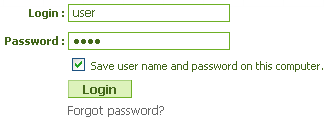
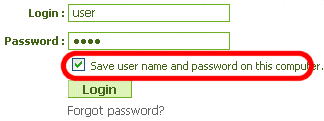
"Remember Me" feature
- How might an app implement a "Remember Me" feature, where the user's login info is remembered and reused when the user comes back later?
- Is this stored as session data? Why or why not?
- What concerns come up when trying to remember data about the user who has logged in?
15.1: Security Principles
-
15.1: Security Principles
-
15.2: Cross-Site Scripting (XSS)
-
15.3: Validating Input Data
-
15.4: SQL Injection
-
15.5: Session-Based Attacks
Our current view of security
- until now, we have assumed:
- valid user input
- non-malicious users
- nothing will ever go wrong
- this is unrealistic!
The real world
- in order to write secure code, we must assume:
- invalid input
- evil users
- incompetent users
- everything that can go wrong, will go wrong
- everybody is out to get you
- botnets, hackers, script kiddies, KGB, etc. are out there
- assume nothing; trust no one
Attackers' goals
Why would an attacker target my site?
- Read private data (user names, passwords, credit card numbers, grades, prices)
- Change data (change a student's grades, prices of products, passwords)
- Spoofing (pretending to be someone they are not)
- Damage or shut down the site, so that it cannot be successfully used by others
- Harm the reputation or credibility of the organization running the site
- Spread viruses and other malware
Tools that attackers use
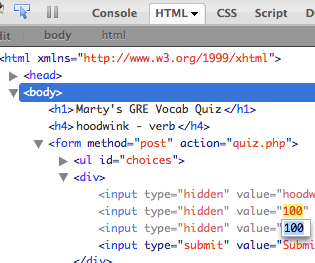
Assume that the attacker knows about web dev and has the same tools you have:
-
-
extensions e.g.
-
, e.g.
- network sniffers, e.g.
,
,
Some kinds of attacks
- Denial of Service (DoS): Making a server unavailable by bombarding it with requests.
- Social Engineering: Tricking a user into willingly compromising the security of a site (e.g. phishing).
- Privilege Escalation: Causing code to run as a "privileged" context (e.g. "root").
- Information Leakage: Allowing an attacker to look at data, files, etc. that he/she should not be allowed to see.
- Man-in-the-Middle: Placing a malicious machine in the network and using it to intercept traffic.
- Session Hijacking: Stealing another user's session cookie to masquerade as that user.
- Cross-Site Scripting (XSS) or HTML Injection: Inserting malicious HTML or JavaScript content into a web page.
- SQL Injection: Inserting malicious SQL query code to reveal or modify sensitive data.
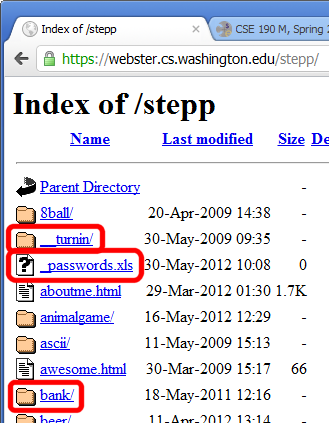
Information leakage
when the attacker can look at data, files, etc. that he/she should not be allowed to see
-
files on web server that should not be there
- or have too generous of permissions (read/write to all)
-
directories that list their contents (indexing)
- can be disabled on web server
-
guess the names of files, directories, resources
- see
loginfail.php, try loginsuccess.php
- see
user.php?id=123, try user.php?id=456
- see
/data/public, try /data/private
15.2: Cross-Site Scripting (XSS)
-
15.1: Security Principles
-
15.2: Cross-Site Scripting (XSS)
-
15.3: Validating Input Data
-
15.4: SQL Injection
-
15.5: Session-Based Attacks
Cross-site scripting (XSS)
a flaw where a user is able to inject and execute arbitrary JavaScript code in your page
insecure.php?question=<script type='text/javascript'>alert('pwned');</script>
<h1>Your question is: <?php $_GET['question'] ?></h1>
- injected script code can:
- masquerade as the original page and trick the user into entering sensitive data
- steal the user's cookies
- masquerade as the user and submit data on their behalf (submit forms, click buttons, etc.)
- ...
- Reflected XSS rendered back to the user clicks on the link containing or activating it
- Stored XSS when bad code is persisted so that other users are vulnerabilt to it
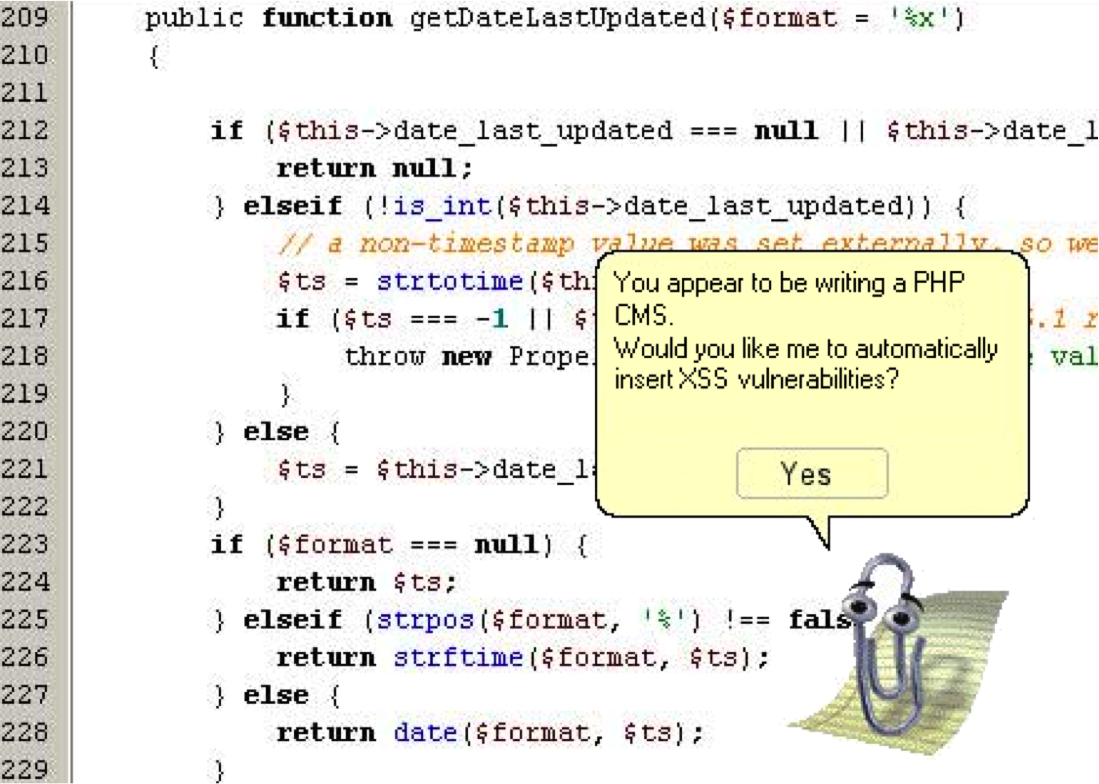
- A sad but true real-world example of a XSS vulnerability
Securing against XSS
- one idea: disallow harmful characters
- XSS is impossible without < >
- can strip those characters from input, or reject the entire request if they are present
- another idea: allow them, but escape them
$text = "<p>hi 2 u & me</p>";
$text = htmlspecialchars($text);
Rails does this automatically -- use html_safe, raw, etc. helper functions to render properly escaped HTML in a view
15.3: Validating Input Data
-
15.1: Security Principles
-
15.2: Cross-Site Scripting (XSS)
-
15.3: Validating Input Data
-
15.4: SQL Injection
-
15.5: Session-Based Attacks
What is form validation?
- validation: ensuring that form's values are correct
- some types of validation:
- preventing blank values (email address)
- ensuring the type of values
- integer, real number, currency, phone number, Social Security number, postal address, email address, date, credit card number, ...
- ensuring the format and range of values (ZIP code must be a 5-digit integer)
- ensuring that values fit together (user types email twice, and the two must match)
validates :voting_age, numericality: { greater_than_or_equal_to: 18 }
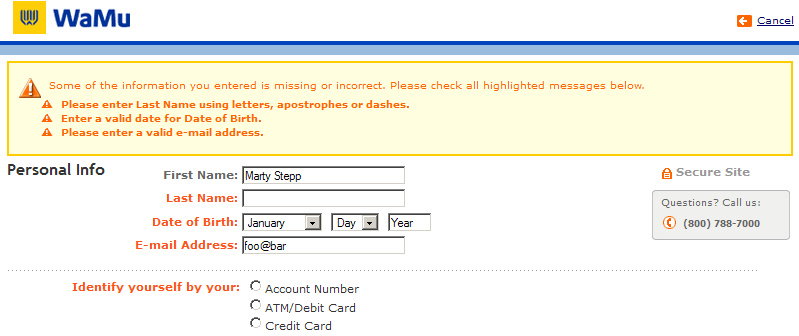
A real form that uses validation
Client vs. server-side validation
Validation can be performed:
- client-side (in JavaScript, before the form is submitted)
- can lead to a better user experience, but not secure (why not?)
- server-side (in PHP code, after the form is submitted)
- needed for truly secure validation, but slower
- by the model (in Rails or within storage engine, after the form is submitted)
- often specific to the backend database being used
- all three
- best mix of convenience and security, but requires most effort to program
An example form to be validated
<form action="http://foo.com/foo.php" method="get">
	<div>
		City:  <input name="city" /> <br />
		State: <input name="state" size="2" maxlength="2" /> <br />
		ZIP:   <input name="zip" size="5" maxlength="5" /> <br />
		<input type="submit" />
	</div>
</form>
- Let's validate this form's data on the server...
Basic server-side validation code
$city  = $_REQUEST["city"];
$state = $_REQUEST["state"];
$zip   = $_REQUEST["zip"];
if (!$city || strlen($state) != 2 || strlen($zip) != 5) {
	print "Error, invalid city/state/zip submitted.";
}
- basic idea: examine parameter values, and if they are bad, show an error message and abort. But:
- How do you test for integers vs. real numbers vs. strings?
- How do you test for a valid credit card number?
- How do you test that a person's name has a middle initial?
- (How do you test whether a given string matches a particular complex format?)
Regular expressions
/^[a-zA-Z_\-]+@(([a-zA-Z_\-])+\.)+[a-zA-Z]{2,4}$/
- regular expression ("regex"): a description of a pattern of text
- can test whether a string matches the expression's pattern
- can use a regex to search/replace characters in a string
- regular expressions are extremely powerful but tough to read
(the above regular expression matches email addresses)
- regular expressions occur in many places:
- Java:
Scanner, String's split method (CSE 143 sentence generator)
- supported by PHP, JavaScript, and other languages
- many text editors (TextPad) allow regexes in search/replace
- regex syntax: strings that begin and end with
/, such as "/[AEIOU]+/"
| function |
description |
preg_match(regex, string)
|
returns TRUE if string matches regex
|
preg_replace(regex, replacement, string)
|
returns a new string with all substrings that match regex replaced by replacement
|
preg_split(regex, string)
|
returns an array of strings from given string broken apart using given regex as delimiter (like explode but more powerful)
|
PHP form validation w/ regexes
$state = $_REQUEST["state"];
if (!preg_match("/^[A-Z]{2}$/", $state)) {
	print "Error, invalid state submitted.";
}
preg_match and regexes help you to validate parameters- sites often don't want to give a descriptive error message here (why?)
Basic regular expressions
/abc/
- in PHP, regexes are strings that begin and end with
/
- the simplest regexes simply match a particular substring
- the above regular expression matches any string containing
"abc":
-
YES:
"abc",
"abcdef",
"defabc",
".=.abc.=.",
...
-
NO:
"fedcba",
"ab c",
"PHP",
...
Wildcards: .
- A dot
. matches any character except a \n line break
/.oo.y/ matches
"Doocy",
"goofy",
"LooNy",
...
- A trailing
i at the end of a regex (after the closing /) signifies a case-insensitive match
-
/mart/i matches
"Marty Stepp",
"smart fellow",
"WALMART",
...
Special characters: |, (), \
| means OR
/abc|def|g/ matches "abc", "def", or "g"- There's no AND symbol. Why not?
() are for grouping
/(Homer|Marge) Simpson/ matches "Homer Simpson"
or "Marge Simpson"
\ starts an escape sequence
- many characters must be escaped to match them literally:
/ \ $ . [ ] ( ) ^ * + ?
/<br \/>/ matches lines containing <br /> tags
Quantifiers: *, +, ?
* means 0 or more occurrences
/abc*/ matches "ab", "abc", "abcc", "abccc", .../a(bc)*/ matches "a", "abc", "abcbc", "abcbcbc", .../a.*a/ matches "aa", "aba", "a8qa", "a!?xyz__9a", ...
+ means 1 or more occurrences
/a(bc)+/ matches "abc", "abcbc", "abcbcbc", .../Goo+gle/ matches "Google", "Gooogle", "Goooogle", ...
? means 0 or 1 occurrences
/a(bc)?/ matches "a" or "abc"
More quantifiers: {min,max}
{min,max} means between min and max occurrences (inclusive)
/a(bc){2,4}/ matches "abcbc", "abcbcbc", or "abcbcbcbc"
- min or max may be omitted to specify any number
{2,} means 2 or more{,6} means up to 6{3} means exactly 3
Anchors: ^ and $
^ represents the beginning of the string or line;
$ represents the end
-
/Jess/ matches all strings that contain Jess;
/^Jess/ matches all strings that start with Jess;
/Jess$/ matches all strings that end with Jess;
/^Jess$/ matches the exact string "Jess" only
-
/^Mart.*Stepp$/ matches "MartStepp", "Marty Stepp", "Martin D Stepp", ...
but NOT "Marty Stepp stinks" or "I H8 Martin Stepp"
-
(on the other slides, when we say,
/PATTERN/ matches "text", we really mean that it matches any string that contains that text)
Character sets: []
-
[] group characters into a character set; will match any single character from the set
/[bcd]art/ matches strings containing "bart", "cart", and "dart"- equivalent to
/(b|c|d)art/ but shorter
- inside
[], many of the modifier keys act as normal characters
/what[!*?]*/ matches "what", "what!", "what?**!", "what??!", ...
- What regular expression matches DNA (strings of A, C, G, or T)?
Character ranges: [start-end]
- inside a character set, specify a range of characters with
-
/[a-z]/ matches any lowercase letter/[a-zA-Z0-9]/ matches any lower- or uppercase letter or digit
- an initial
^ inside a character set negates it
/[^abcd]/ matches any character other than a, b, c, or d
- inside a character set,
- must be escaped to be matched
/[+\-]?[0-9]+/ matches an optional + or -, followed by at least one digit
- What regular expression matches letter grades such as A, B+, or D- ?
Escape sequences
- special escape sequence character sets:
-
\d matches any digit (same as [0-9]);
\D any non-digit ([^0-9])
-
\w matches any word character
(same as [a-zA-Z_0-9]);
\W any non-word char
-
\s matches any whitespace character ( , \t, \n, etc.);
\S any non-whitespace
- What regular expression matches dollar amounts of at least $100.00 ?
Regular expression PHP example
$str = "the quick brown fox";
$str = preg_replace("/[aeiou]/", "*", $str);
$words = preg_split("/[ ]+/", $str);
for ($i = 0; $i < count($words); $i++) {
if (preg_match("/\\*{2,}/", $words[$i])) {
$words[$i] = strtoupper($words[$i]);
}
}
- notice how
\ must be escaped to \\
Regular expressions in JavaScript
string.match(regex)
- if string fits the pattern, returns the matching text; else returns
null
- can be used as a Boolean truthy/falsey test:
var name = $("name").value;
if (name.match(/[a-z]+/)) { ... }
- an
i can be placed after the regex for a case-insensitive match
name.match(/Aardvark/i) will match "aardvark", "AaRdVaRk", ...
Replacing text with regular expressions
string.replace(regex, "text")
- replaces the first occurrence of given pattern with the given text
var str = "Marty Stepp";
str.replace(/[a-z]/, "x") returns "Mxrty Stepp"- returns the modified string as its result; must be stored
str = str.replace(/[a-z]/, "x")
- a
g can be placed after the regex for a global match (replace all occurrences)
str.replace(/[a-z]/g, "x") returns "Mxxxx Sxxxx"
- replace with empty string to use a regex as a filter
str = str.replace(/[^A-Z]+/g, "") turns str into "MS"
Regular expressions in Ruby and Rails
match method
/needle/.match('haystack') #=> nil
/hay/.match('haystack') #=> #<MatchData "hay">
- Patter surrounded with
// or %r{}
- In calls to
validates
validates :url, format: { with: %r{\A(https?:)?//(\w+\.)+[a-z]{2,}} }

validates :email, format: { with: /\A([^@\s]+)@((?:\w+\.)+[a-z]{2,})\Z/i }
15.4: SQL Injection
-
15.1: Security Principles
-
15.2: Cross-Site Scripting (XSS)
-
15.3: Validating Input Data
-
15.4: SQL Injection
-
15.5: Session-Based Attacks
SQL injection
a flaw where the user is able to inject arbitrary SQL into your query
-
This flaw often exists when a page accepts user input and inserts it bare into the query.
-
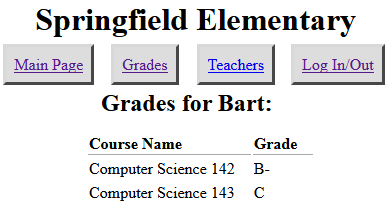
example: simpsons grade lookup
-
What kinds of SQL can we inject into the query? Why is this bad?
Too true...
- injected SQL can:
- change the query to output others' data (revealing private information)
- insert a query to modify existing data (increase bank account balance)
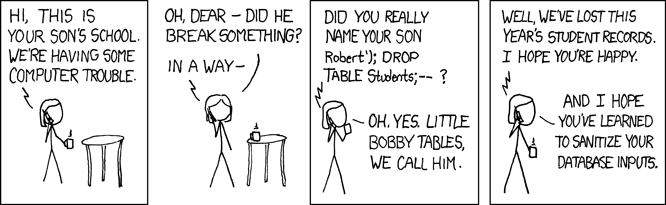
- delete existing data (
; DROP TABLE students; -- )
- bloat the query to slow down the server (
JOIN a JOIN b JOIN c ...)
Securing against SQL injection
- similar to securing against XSS, escape the string before you include it in your query
quote
|
returns a SQL-escaped version of a string
|
$username = $db->quote($_POST["username"]);
$password = $db->quote($_POST["password"]);
$query = "SELECT name, ssn, dob FROM users
WHERE username = $username AND password = $password";
- replaces
' with \', etc., and surrounds with quotes
Parameterized Queries
- An even better approach...
new_users = Users.where( 'created_at > ?', 3.days.ago );
- Yields the following SQL query
selct * from users where created > ?
- Passes the result of
3.days.ago as a parameter
- ? in where clause referred to as placeholder or beind variable
- Has additional advantages
- Avoides annoying database-specific quoting issues
- In Oracle:
- 'Aardvark's' gets escaped to 'Aarkdvark''s'
- 'Moe > Larry' gets escaped to 'Moe '||'>'||' Larry'
- More efficient: databae may compile the query one time and then call it with different values for bind variables (like a function)
Injection attacks are not limited to SQL
<?php include( $_GET["file"] ) ?>
15.5: Session-Based Attacks
-
15.1: Security Principles
-
15.2: Cross-Site Scripting (XSS)
-
15.3: Validating Input Data
-
15.4: SQL Injection
-
15.5: Session-Based Attacks
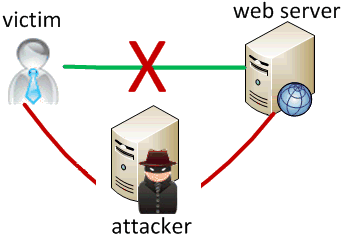
Man-in-the-middle attack
when the attacker listens on your network and reads and/or modifies your data
-
works if attacker can access and compromise any server/router between you and your server
-
also works if you are on the same local area or wifi network as the attacker
-
often, the attacker still sends your info back and forth to/from the real server, but he silently logs or modifies some of it along the way to his own benefit
-
e.g. listens for you to send your user name / password / credit card number / ...
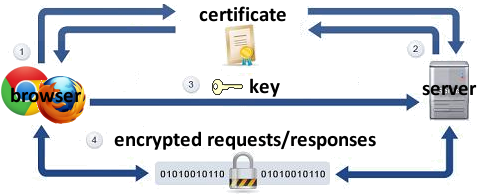
Secure HTTP (HTTPS)
-
: encrypted version of HTTP protocol
-
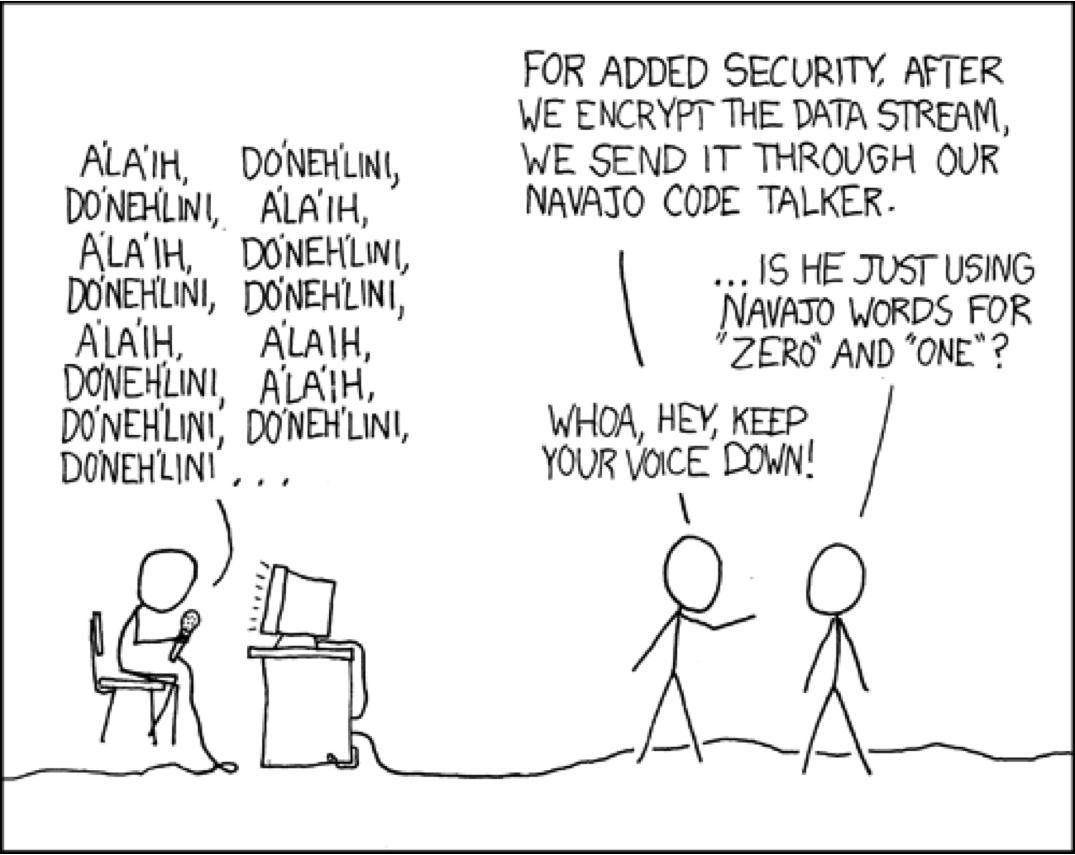
all messages between client and server are encrypted so men in the middle cannot easily read them
- Client encrypts messages using the server's public key
- Server decrypts client's messages using its private key
-
servers can have certificates that verify their identity
Session hijacking
when the attacker gets a hold of your session ID and masquerades as you
-
exploit sites that use HTTPS for only the initial login:
- HTTPS: browser → server (POST login.php)
- HTTPS: browser ← server (login.php + PHPSESSID cookie)
- HTTP: browser → server (GET whatever.php + PHPSESSID cookie)
- HTTP: browser ← server (whatever.php + PHPSESSID cookie)
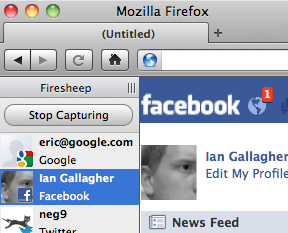
- attacker can listen to the network, get your session ID cookie, and make requests to the same server with that same session ID cookie to masquerade as you!
- example:
Cross-Site Request Forgery (CSRF)
when the attacker tricks you into submitting a malicious request on their behalf
- Based on user's identity or authenticated state
- Performs undesired actions on the victim's behalf (i.e. make purchase, transfer money, etc.)
- Can occur when a user loads a page with an embedded CSRF attack - i.e. forum, blog post, email
- Example
Defending against CSRF attacks
- Limit the number and scope of single-request actions available to users
- Require additional authentication from users prior to allowing sensitive requests
- Anti-CSRF Token - require that a unique and expected token is included and verified with sensitive requests
OWASP Top 10
OWASP (Open Web Application Security Project) provides tools and information to make software more secure.
- Injection
- Broken Authentication and Session Management
- Cross-Site Scripting (XSS)
- Insecure Direct Object References
- Security Misconfiguration
- Sensitive Data Exposure
- Missing Function Level Access Control
- Cross-Site Request Forgery (CSRF)
- Using Components with Known Vulnerabilities
- Unvalidated Redirects and Forwards
Secure Development Best Practices
- Keep security in mind from the start of and throughout the development process
- Break your own code because the bad guys will if you don't
- Defense in-depth
- Engineer multiple levels of security
- If an attacker gets by one level, they may be thwarted by a subsequent level
- Example
- Secure encrypted communication via SSL/HTTPS
- Role based user authentication
- Strict input validation (to defend against XSS, SQL ingjection, CSRF, etc.)
- Backend data validation (in case data within internal storage systems is compromised)
- Sensitive data stored with strong encryption (i.e AES with at least 256 bit key)
- Use two-factor authentication -- User needs multiple pieces of data to access a restricted resoruc
- Something you know (i.e. passcode)
- Something you have (i.e. cell phone with authentication token)
- Something you are (i.e. fingerprint, retina scan)
Secure software development from a Christian perspective
- Defending the weak
- Fighting against evil
- An ongoing mission
- Success in secure software development is measured by what does not happen
Homework 7